TL;DR — Making the VA's Mail Visible
The U.S. Department of Veterans Affairs processes 14 million mail packets a year. Each one passes through 3–6 departments, with routing rules that live in people's heads, email chains, and spreadsheets. Nobody could tell you where a packet was, who had it, or when it would arrive.
I designed a no-code workflow builder — the Doc Rule Canvas — that lets VA administrators model their own routing logic using a WHEN → IF → THEN grammar, without writing code or filing engineering tickets. It plugs into existing OCR and AI pipelines, so the system reads, classifies, and routes packets automatically while humans handle the edge cases.
I was the sole designer on this work, which is not the same as doing it alone. The service blueprint, the rule grammar, and the canvas itself came out of months of back-and-forth with the engineering leads who own the OCR and workflow infrastructure, the QA analysts who catch what the models miss, and the intake supervisors whose mental model the grammar had to mirror. What I brought was the design spine — the shared vocabulary they could point at, edit, and push back on.

14 Million Packets, Zero Visibility
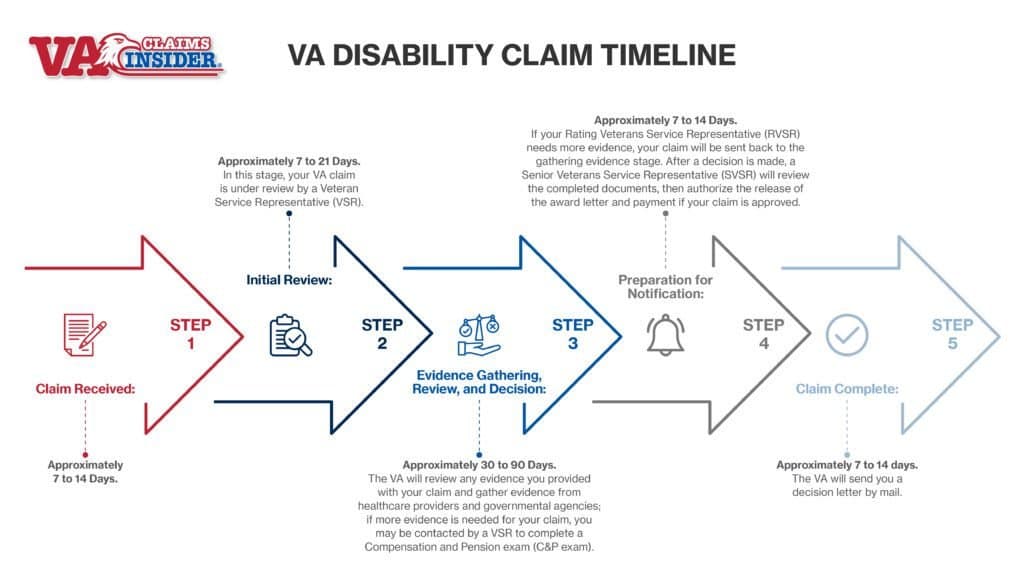
The VA isn't one organization — it's three sectors (Veterans Benefits, Veterans Health, National Cemeteries), each with specialized departments that enforce their own rules. A single benefits claim might need Health redaction before Benefits can release it, QA sign-off before payment, and archival once resolved. Every detour was invisible. Status lived in someone's inbox.
The challenge wasn't digitizing paper — it was codifying the invisible routing logic so any sector could model its own rules without custom code.
Three-Tier Processing Architecture
Sector → Department → Processing Layer — packets route through domain-specific rules at each tier
Every packet flows through three levels: the Sector determines domain (Benefits, Health, Cemeteries), the Department applies specialized rules and creates work orders, and the Processing Layer handles re-routing, reviewer approval, and quality control. The Doc Rule Canvas lets administrators configure all three tiers without engineering involvement.
The Infrastructure Gap
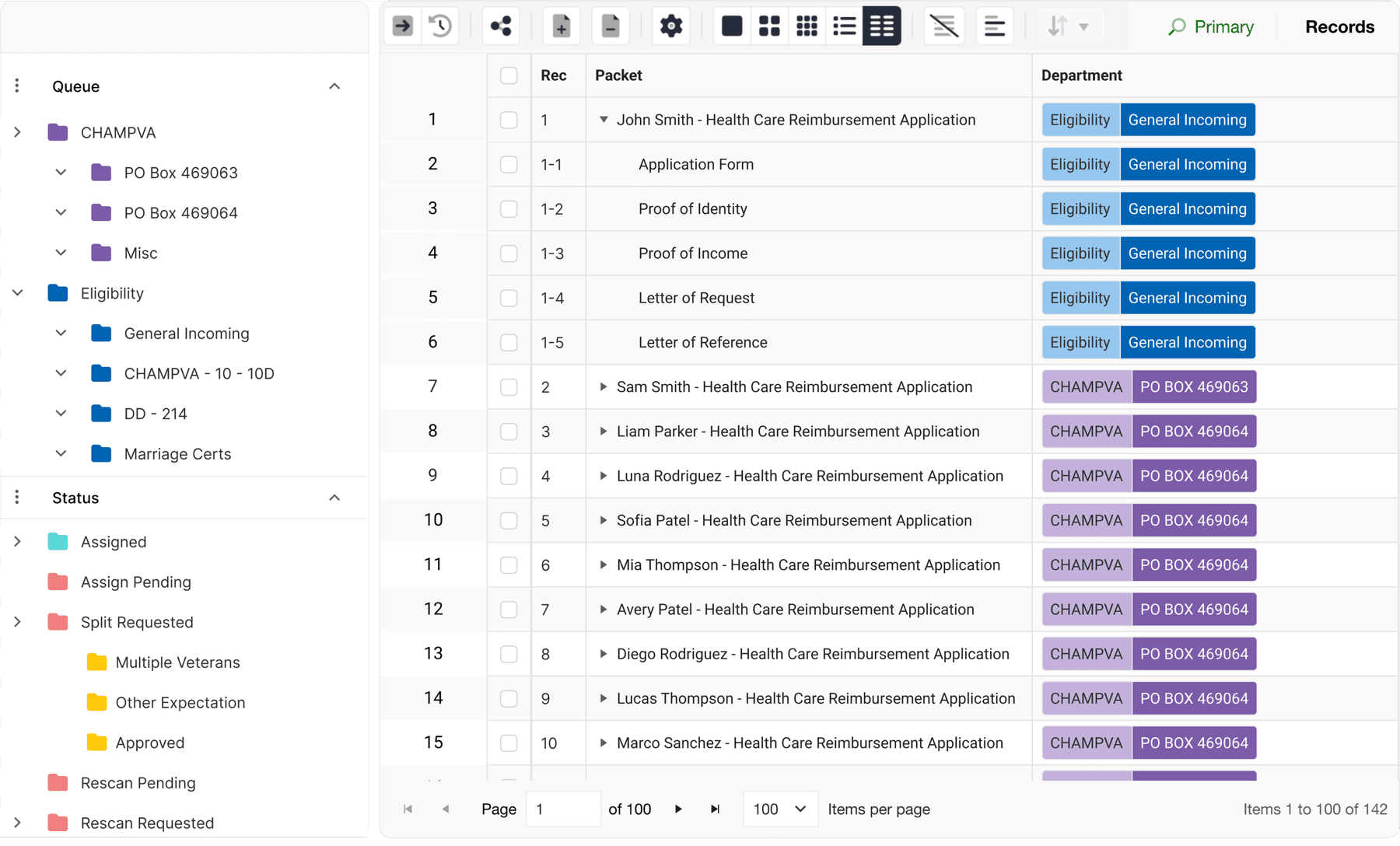
Existing folder hierarchy mapped to VA departments — structure was there, metadata wasn't
The folder hierarchy already mirrored VA departmental structure — the bones were right. What was missing were the metadata fields that make routing possible: who owns this packet, what's its status, when was it last touched. I designed new lifecycle fields (status labels, owner assignment, action timestamps) and standardized existing folder taxonomies into logic triggers the workflow engine could act on.
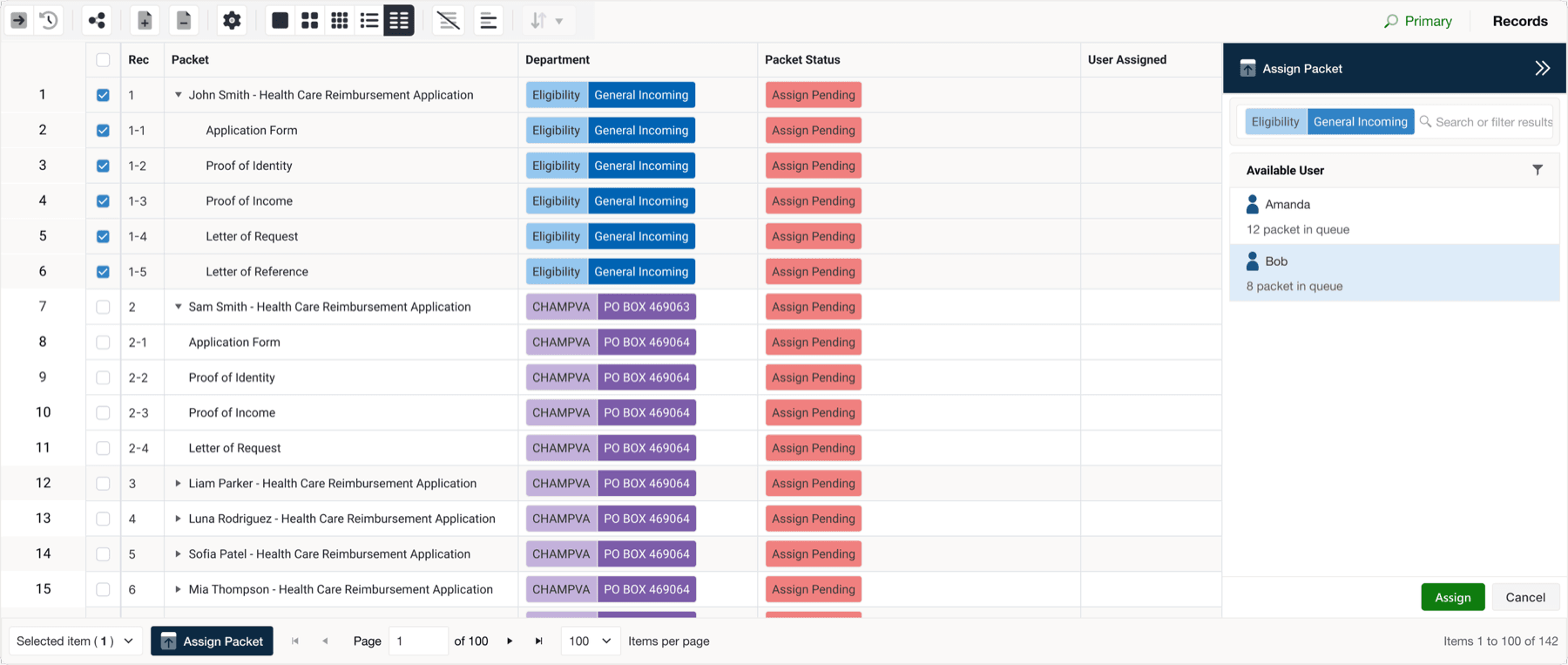
Assignment interface — packets get owners, statuses, and lifecycle timestamps
From Static Rails to Living Workflow
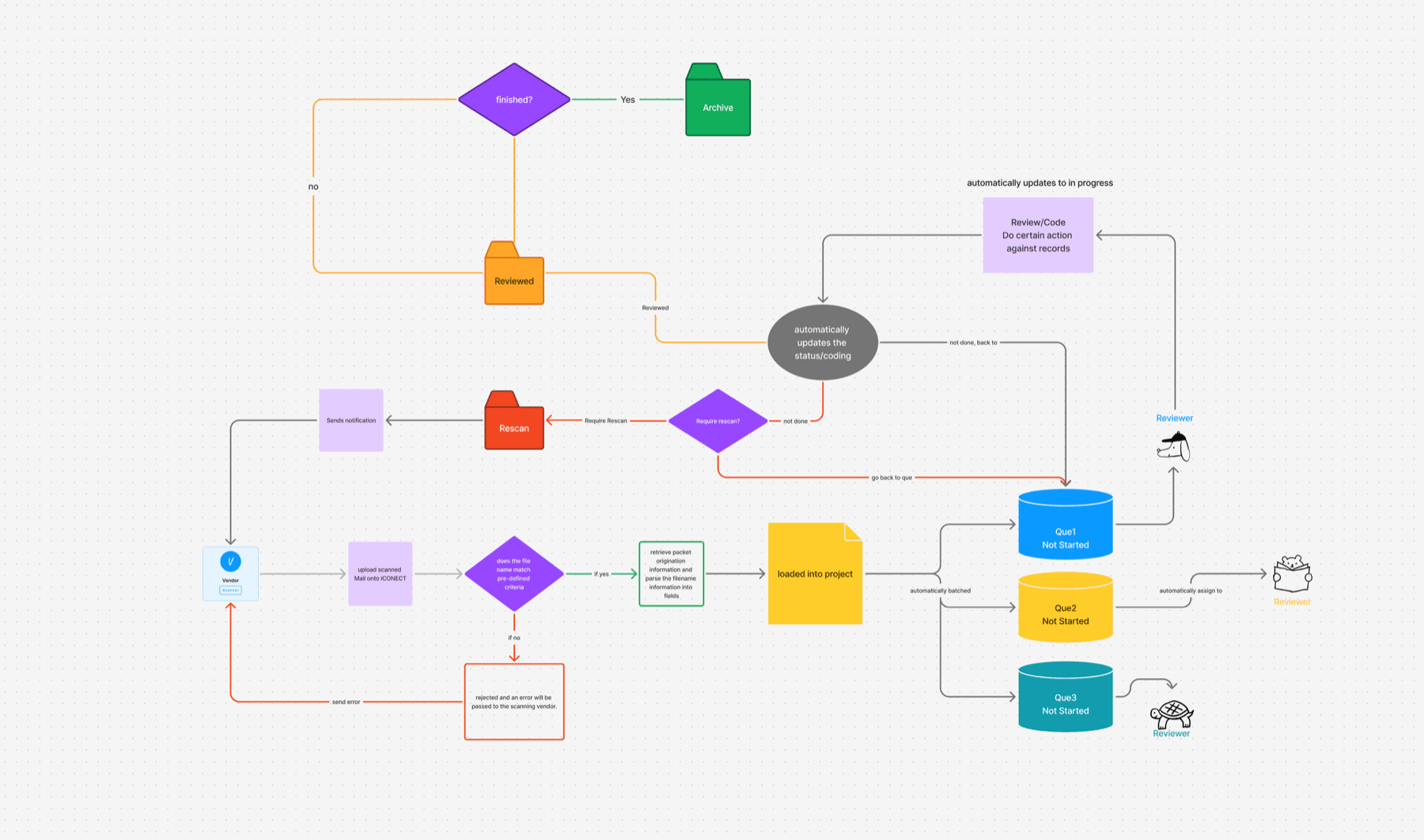
I mapped the full journey — post-mark through scanning, intake, analysis, QA, and archive — using service blueprints and RACI matrices to expose every decision gate and stall point. The key constraint surfaced quickly: each sector revises its business rules constantly. If every rule change required an engineering sprint, the system would be outdated before it shipped.
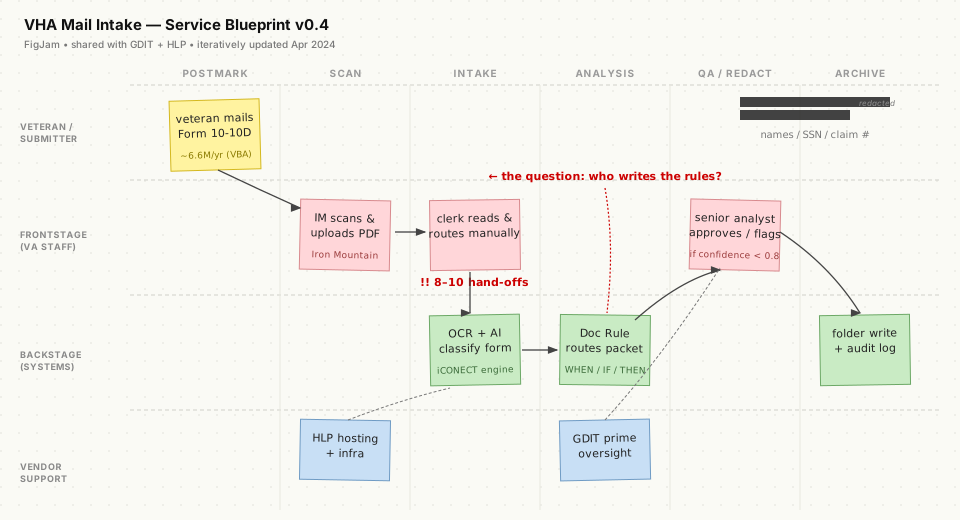
Working blueprint from the discovery phase — the version before it got cleaned up for a steering committee
That constraint became the design brief: the workflow engine couldn't just be configurable — it had to be authorable by the people who understand the rules, not the people who write code.
The Doc Rule Canvas
No-code rule builder — WHEN/IF/THEN blocks mirror the service blueprint language administrators already use
The canvas uses a WHEN → IF → THEN grammar that mirrors how administrators already describe their rules in meetings. A real example: When Status = Empty AND Form Classification = "10-10D" → Run AI Prompt "Classify Attachments" → write result to Form Classification → Move packet to CHAMPVA/10-10D folder → Notify Queue Supervisor.
No JSON. No tickets. The person who knows the rule writes the rule.
AI as “Another Verb” in the Grammar
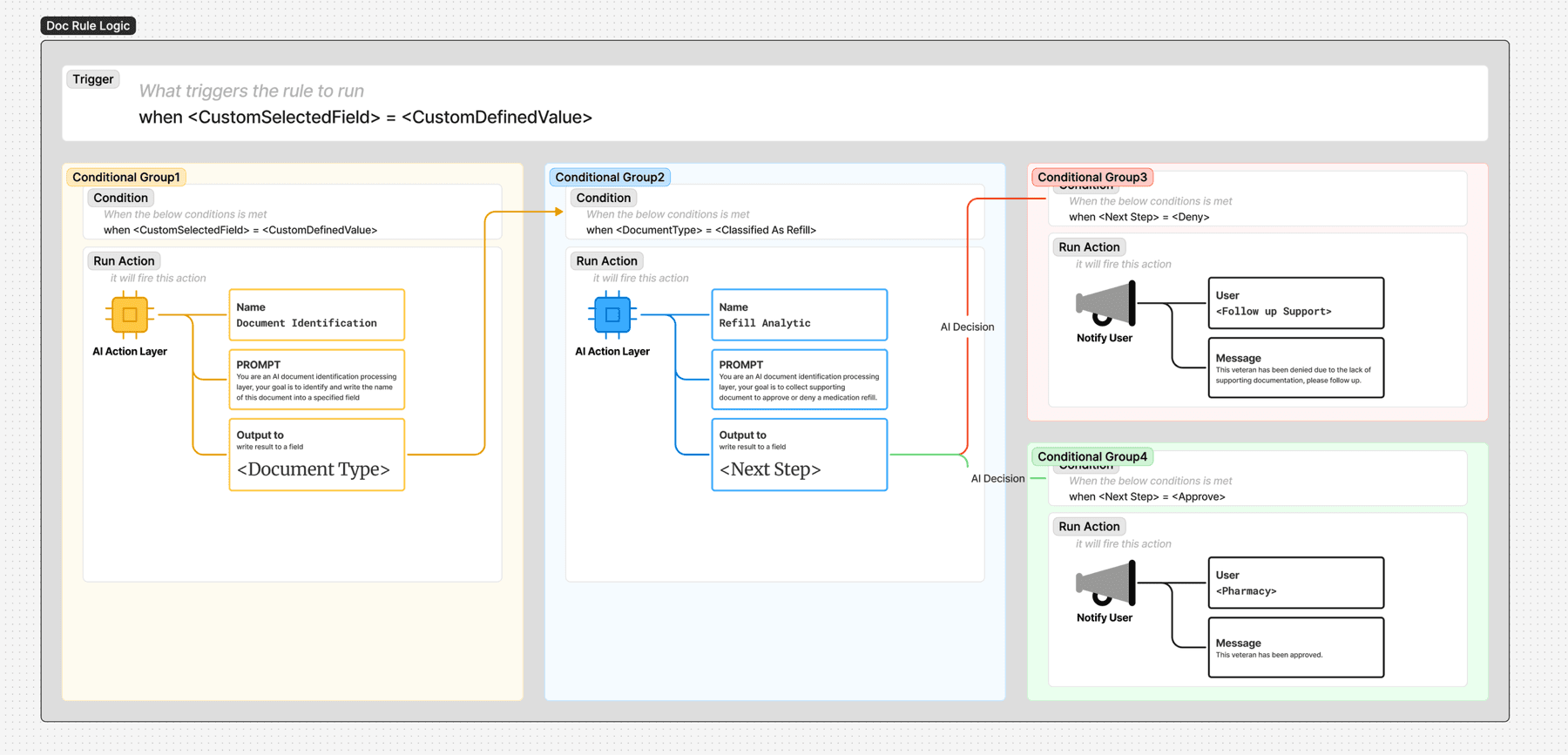
AI actions slot into the same WHEN/IF/THEN grammar — confidence scores determine automatic vs. human routing
AI doesn't replace the workflow — it becomes another action inside it, honoring the same grammar users already know. Five capabilities layer in progressively:
Scan-Quality Gate
Flags bad scans (skew, low OCR confidence <85%) for manual rescan before any downstream processing begins.
Form Classification
LLM classifies the document form and extracts anchor entities — SSN, Claim ID, Date of Service — with per-field confidence scores.
Confidence Routing
Doc Rules pivot on extraction confidence: ≥0.90 routes automatically, <0.90 escalates to a senior analyst. The threshold is tunable per sector.
Feedback Loop
QA corrections feed back as ground truth. Nightly retraining closes precision gaps by ~5 percentage points every two weeks.
Transparent Controls
Each sector authors its own prompt sets and tunes risk thresholds through the Doc Rule interface. No engineering required.
What Changed
A packet that used to take 2–3 days to reach its first action now moves in hours, sometimes minutes. Manual hand-offs fell by roughly 80%, and the 20-working-day FOIA clock — which used to be a scramble — is now comfortably met.
The initial pilot reached ~7,000 VA staff processing roughly 1 million packets per year. Full rollout targets ~400,000 VHA employees, a $306M task order within the broader $5.4B VICCS IDIQ program (public record).
What made it stick was a clickable prototype in front of every sprint so business owners could argue with a screen instead of a spec, plus treating AI as one more verb in a grammar the intake team already spoke. The hard part was never the models — it was giving non-engineers a place to put their rules.
See it in action
Explore the interactive Figma prototype — configure rules, set triggers, and experience the no-code workflow builder.
Launch Interactive Prototype →Interactive prototype