TL;DR — A Pipeline You Can See
Compliance teams running breach-notification reviews had every AI tool they needed — extraction models, deduplication logic, a review interface — but no way to see how they connected. Every new project meant an engineering ticket. Every routing change meant a sprint cycle. The pipeline was invisible.
I built a canvas-based visual workflow builder where teams drag AI agents onto a spatial canvas, wire conditional routing between them, and run multi-agent pipelines with real-time monitoring. Internal demo presented to CPO, CTO, and board — now under feasibility evaluation for production.
One caveat worth stating up front: I designed and coded this prototype on my own, outside the main product roadmap. The review it's currently in is a team effort — engineering leads are stress-testing the runtime, compliance is pressure-testing the audit story, and the eDiscovery practitioners are telling me where my assumptions break. What ships, if anything ships, won't look exactly like what's here.
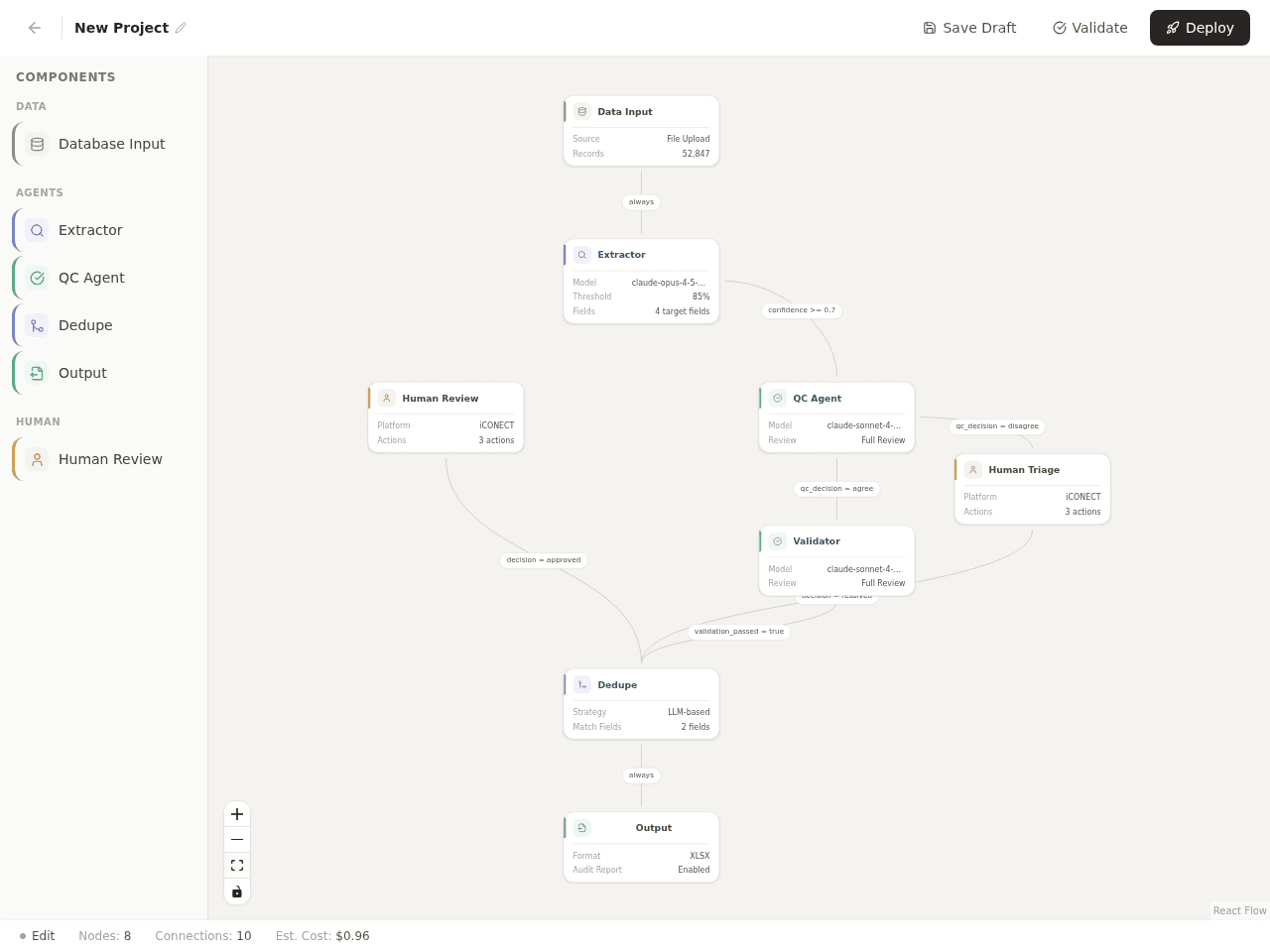
Advanced template — 8 nodes, 10 connections, conditional routing on confidence scores and QC decisions
The Orchestration Gap
eDiscovery teams processing breach notifications run a four-stage pipeline: scoping affected data, extracting PII from documents, deduplicating records, and generating notification lists. At iCONECT, each stage had tooling. What didn't exist was a way to compose these capabilities into a single, visible, end-to-end workflow.
Every new project required engineering to configure the pipeline. Every routing change meant a ticket and a sprint cycle. Compliance teams could see individual tools but not the pipeline connecting them. The question I kept returning to: what if the pipeline itself was the interface?
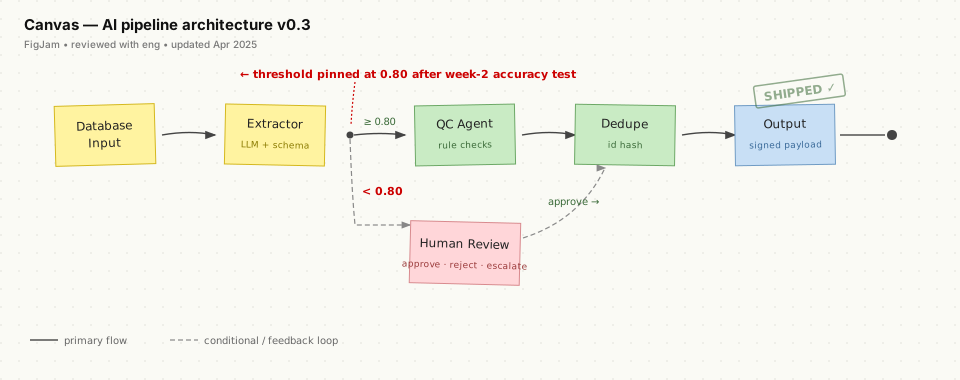
Core pipeline architecture — confidence scores determine whether records flow to automated QC or human review
The Pipeline Is the Interface
The design borrows the node-based pattern from tools like n8n, Retool, and Unreal Engine blueprints, but adapts it for compliance teams who don't write code and don't want to. The canvas doubles as configuration and monitoring — you build the workflow in the same surface where you later watch it run.
Six Agent Types, One Canvas
Each node on the canvas represents a stage with its own behavior and configuration panel:
Database Input
Upload data, connect to existing projects, or pull from prior analysis. Shows record count, field count, detected PII types.
Extractor
LLM-powered field extraction. Pick a model (Claude, GPT-4o), define target fields with types, set per-field confidence thresholds. Accepts domain context and compliance flags (HIPAA, PCI-DSS, GDPR).
QC Agent
Validates extraction accuracy. Full review or configurable sampling rate. Custom validation rules: SSN format, date format, required fields.
Dedupe Agent
Three strategies: exact match on primary keys, fuzzy match with per-field similarity thresholds, or LLM-based semantic entity resolution.
Human Review
The human-in-the-loop gate. Routes low-confidence records to reviewers. Original text alongside extracted data with per-field scores. Actions: Approve, Reject, Escalate.
Output
Export as XLSX, CSV, or JSON. Optional audit report tracing each record's path through the pipeline.
Confidence as the Decision Primitive
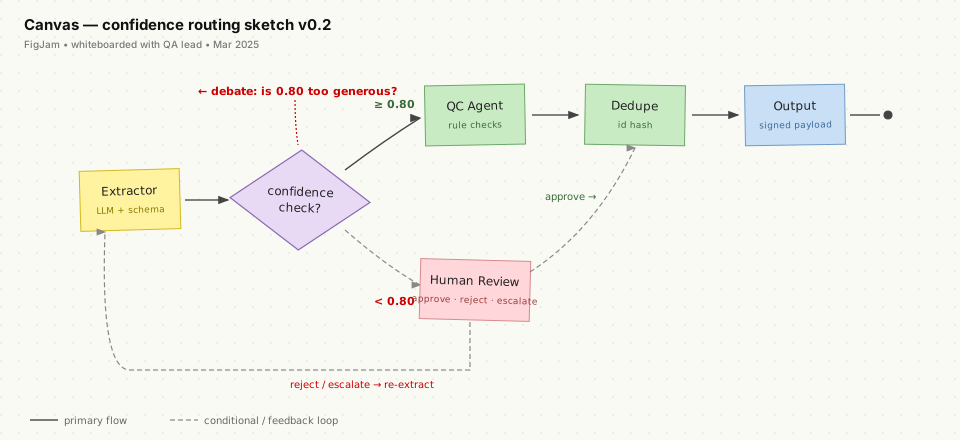
Edges between nodes carry routing logic. A typical split: records with confidence above 0.80 flow to the QC Agent for automated validation. Records below 0.80 flow to Human Review. Each edge supports multi-operator conditions (AND/OR), priority levels, and a reasoning field — because when a compliance officer opens a workflow someone else built, they need to understand not just what the routing does, but why.
The Advanced template adds agent disagreement detection: when the QC Agent disagrees with the Extractor, the record routes to Human Triage instead of proceeding. When two AI agents can't reconcile, a person makes the call.
Human Oversight — Not Optional
The Human Review node was the most important design decision. The system never makes a final call on a record when confidence falls below threshold. Agents handle volume. Humans handle judgment.
Reviewers see original text, extracted data, and confidence scores side by side. Low-confidence fields are highlighted. The approve/reject/escalate model mirrors existing legal review workflows — no new mental model required.
The Version That Didn't Survive
The first pass at this was a list-based configuration table — numbered steps, an “input from” column, an “output to” column. Every rule was legible on its own, but nobody could answer “what flows where?” without tracing IDs across rows. Forks hid inside comma-separated cells. Disconnected steps looked fine. I killed it on day three.
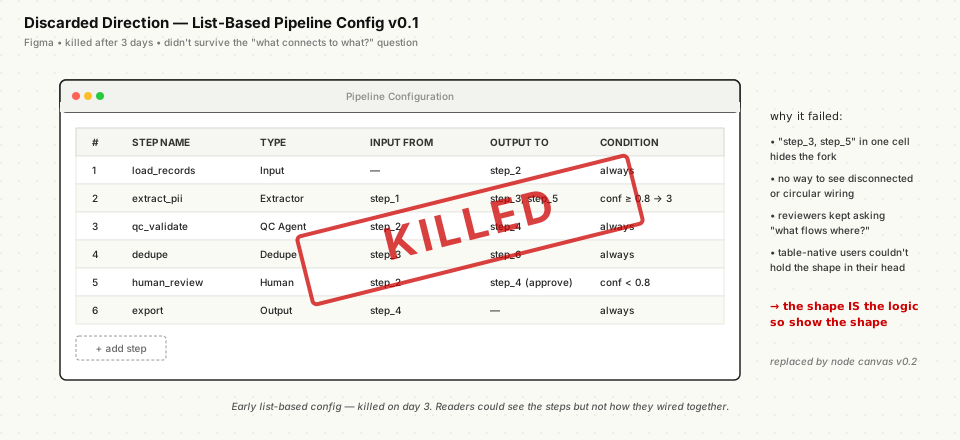
Early list-based pipeline config — killed on day three after reviewers kept asking “what connects to what?”
The lesson that carried into the canvas version: in an agent pipeline, the shape of the graph is the logic. If the UI doesn't show the shape, reviewers can't verify the behavior.
Code-First, Figma Second
Built in React 19 with TypeScript using Cursor IDE and Claude. React Flow for the spatial canvas, Zustand for state, Tailwind for styling, Radix UI for accessible components. The prototype runs — nodes execute in topological order, progress bars fill in real time, individual nodes can be paused and resumed mid-pipeline.
Code-first because the core interactions — drag-and-drop composition, conditional edge routing, live execution feedback — don't survive static mockups. Figma came after, for refinement and documentation. Not as the starting point for design thinking.
See it in action
Explore the working prototype — drag agents, wire pipelines, and run executions in real time.
Launch Interactive Prototype →Interactive prototype
Note: This prototype was initiated as a personal product concept. All case-study content reflects the prototype scope, not production features.
Tech
React 19, TypeScript, React Flow, Zustand, Tailwind CSS, Radix UI. Built with Cursor IDE + Claude.